
Last updated: May 16, 2026 | Reading time: 12 minutes
The End of the Old Siri
For nearly 15 years, Siri has been the smartphone assistant that everyone knows but few truly love. It can set timers, check the weather, and send messages — but ask it to do something genuinely complex, and it often falls short. Meanwhile, ChatGPT, Google Gemini, and Anthropic Claude have redefined what people expect from AI: natural conversations, deep reasoning, file uploads, and the ability to take action across apps.
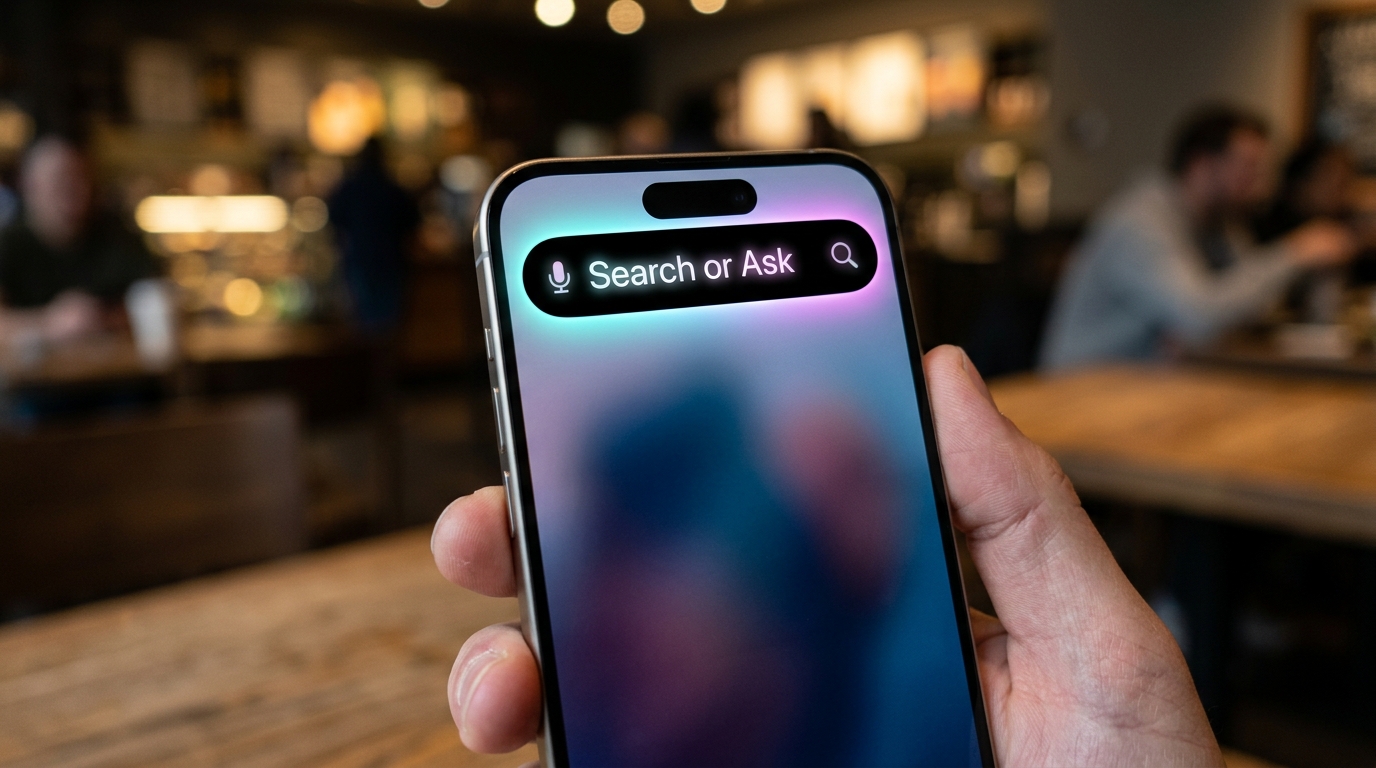
Apple has been listening. In 2024, it quietly integrated ChatGPT into Apple Intelligence. But that was a temporary patch. The real fix arrives this year with iOS 27, which Bloomberg’s Mark Gurman reports will introduce a completely rebuilt Siri — transformed from a reactive voice assistant into an “always-on agent” that can tap into personal data, work across apps, and handle genuine conversations. At the center of this transformation is a simple, system-wide gesture: swiping down from the top center of the screen anywhere in iOS to reveal a “Search or Ask” bar in the Dynamic Island.
This article explains the why behind Apple’s biggest AI overhaul in a decade. You will learn how the new Siri works, what the “Search or Ask” button does, why Apple is opening its AI platform to Google Gemini and Anthropic Claude, and what this means for the future of the iPhone — and for you.
Quick Summary – What iOS 27’s AI Overhaul Means for You
The Strategic Shift – From Voice Assistant to Always‑On Agent
Why is Apple investing so heavily in Siri now? The answer is simple: generative AI changed the rules of the game. ChatGPT proved that people want conversational, capable AI that feels like a collaborator, not a command-line tool. Google Gemini and Anthropic Claude pushed the boundaries further. Apple’s old Siri, by comparison, became a punchline.
But Apple has never been one to rush. Instead of slapping a chatbot onto the iPhone, the company has been quietly rebuilding Siri from the ground up — internally code-named “Campo”. The goal is not just to catch up, but to leapfrog. According to Gurman, iOS 27 will feature a completely rebuilt Siri that moves “away from being a voice assistant and becoming an always-on agent that can tap into personal data and take action across apps”.
Always-On, Always-Aware
What does “always-on agent” actually mean? It means Siri will no longer wait for you to explicitly wake it with a button press or voice command. Instead, it will run persistently in the background, ready to help whenever you need it — and, crucially, able to understand context across apps.
For example, imagine a colleague sends you an email with a meeting time and location. Today, you have to manually copy that information into your calendar. With iOS 27, Siri can read the email, understand the relevant details, and offer to add the event to your calendar — without you lifting a finger. It can draw from your messages, notes, emails, and calendar to fulfill requests in ways that feel genuinely intelligent.
This is not science fiction. Apple has been laying the groundwork for years, with features like on‑device processing and Private Cloud Compute ensuring that personal data stays private even as Siri becomes more capable. The long-announced capability to use personal data contextually and perform actions within apps is expected to finally arrive with iOS 27.
“Search or Ask” – The New System‑Wide AI Gesture
The most visible change in iOS 27 is also the simplest: a new universal gesture that puts AI at your fingertips from anywhere on the iPhone. Users can now swipe down from the top center of the screen — no matter which app they are in — to reveal a “Search or Ask” bar inside the Dynamic Island.
This interface looks similar to Spotlight Search at first glance, but it is far more powerful. According to Bloomberg, it will deliver “more advanced results and additional data from within apps”. In other words, it can search not just the web and your device, but also the content inside your apps — emails, messages, notes, files — and synthesize that information into coherent answers.
How It Works
When you swipe down, a pill-shaped bar appears in the Dynamic Island with a simple prompt: “Search or Ask”. From there, you can:
- Type your question directly into the bar.
- Tap the microphone icon to activate voice mode and speak naturally.
- Tap the search bar itself to toggle between AI engines — choosing from Siri, ChatGPT, Gemini, or other third‑party models.
Once you submit a query, Siri displays a transparent results card in the Dynamic Island. Swipe down on that card, and you enter a threaded conversation mode, where you can continue the dialogue, ask follow‑up questions, and see inline cards for weather, notes, appointments, and other relevant information.
This turns every app into an AI entry point. Whether you are reading a news article, composing an email, or scrolling through social media, the “Search or Ask” gesture is always one swipe away.
A Standalone Siri App – Chat History, Uploads, and File Support
For the first time since Siri’s launch in 2011, Apple is giving the assistant its own dedicated app on the iPhone, iPad, and Mac. This is a profound shift. Until now, Siri was a background service — invoked by voice or button, and then dismissed. With iOS 27, Siri becomes a full, first‑class application that you can open and use like any other app.
The Chat Interface
The standalone Siri app features a chatbot‑style conversational interface that resembles apps like ChatGPT or Claude. At the top, a search bar lets you start new conversations. Below that, a grid of rectangles displays summaries of your past conversations, which you can tap into to revisit or continue.
Key features include:
- Conversation history: All your past Siri chats are saved, searchable, and pinnable for quick access.
- File uploads: A “+” button allows you to upload images and documents directly into conversations — something old Siri could never do.
- Typing support: While voice remains an option, you can also type your questions, making Siri usable in quiet environments or when you prefer text.
- Cross‑device sync: Conversations sync seamlessly across iOS, iPadOS, and macOS 27, so you can start a conversation on your iPhone and continue it on your Mac.
A Persistent AI Companion
The combination of the system‑wide “Search or Ask” gesture and the standalone Siri app means that Siri is no longer something you “summon.” It is something you live with — a persistent AI companion that you can chat with, ask follow‑ups, and build ongoing relationships around topics. This is Apple’s answer to the chatbot era, and it is a decisive move to keep users inside the Apple ecosystem rather than defecting to ChatGPT or Gemini.
Third‑Party “Extensions” – Breaking OpenAI’s Exclusivity
Perhaps the most surprising aspect of iOS 27 is Apple’s decision to open its AI platform to third‑party models. Since Apple Intelligence launched in 2024, ChatGPT has been the only third‑party AI integrated into Siri, Writing Tools, and Image Playground. That changes with iOS 27.
The Extensions Mechanism
Apple is introducing a new mechanism called “Extensions” that allows third‑party AI providers to integrate directly into Apple Intelligence features. Any developer can build an app that supports the Extensions framework, and users can then select their preferred AI service in system settings — switching between Siri, ChatGPT, Gemini, Claude, or any other compatible provider.
This is a major departure from Apple’s traditionally closed ecosystem. The company is effectively turning the iPhone into a neutral platform for AI services, akin to how it treats web browsers or email clients. Users can choose their default AI, and that choice applies system‑wide — to Siri, Writing Tools, Image Playground, and more.
Why Is Apple Doing This?
There are three strategic reasons.
First, ChatGPT usage has been lower than expected following its 2024 debut. Apple may have realized that relying on a single partner — especially one that has become increasingly competitive — is risky.
Second, tensions with OpenAI are growing. OpenAI has been aggressively recruiting Apple’s chip and AI engineers to build its own AI hardware. By opening the platform, Apple reduces its dependence on any single provider and gains leverage in future negotiations.
Third, users want choice. A multi‑model future where people can mix and match AI services is emerging as the industry standard. Apple is positioning itself as the orchestrator, not the maker, of AI — owning the platform while letting others provide the intelligence.
Who Is Already On Board?
Apple has reportedly signed a deal with Google to use a Gemini‑based model for some Apple Intelligence and Siri features. The company has also been internally testing integrations with Anthropic Claude. Both will appear alongside ChatGPT as user‑selectable options directly within the Siri interface.
AI Goes Pro – The Revamped Camera and Visual Intelligence
Apple is not stopping with Siri. The Camera app is also getting a major AI upgrade in iOS 27, with a new dedicated “Siri mode” that integrates visual intelligence directly into the viewfinder.
Camera Becomes an AI Input Device
In iOS 27, you will be able to select “Siri” as a shooting mode — alongside Photo, Video, and Portrait. This replaces the current “Camera Control” button method, making AI‑powered visual intelligence more prominent and discoverable.
Once in Siri mode, you can point your camera at anything and ask questions or take actions:
- Scan nutrition labels to automatically log food intake into the Health app.
- Capture business cards to instantly add contacts.
- Point at a landmark to learn its history.
- Photograph a document to extract text, summarize it, or translate it.
The Photos app is also receiving AI editing tools, including “Extend” (to expand the canvas beyond the frame), “Enhance” (to improve lighting and color), and “Reframe” (to recompose images). These features bring professional‑grade AI editing to every iPhone user.
Visual Intelligence, Everywhere
This shift reflects a broader trend: the camera is becoming a primary input device for AI. Instead of typing or speaking, users can simply point and ask. By embedding AI directly into the Camera app, Apple is making visual intelligence as natural and accessible as taking a photo.
What This Means for the Future of iOS – And for You
iOS 27 is not just an update. It is a platform reset. Apple is transforming the iPhone from a touch‑first device into an AI‑first device, where the primary way you interact with your phone is not tapping and swiping — but asking.
For Users
- A more natural way to use your phone: Instead of navigating through menus and apps, you will increasingly just ask. The “Search or Ask” gesture puts AI at the center of the experience.
- A more capable assistant: Siri can finally do what ChatGPT can — hold conversations, upload files, and take action across apps.
- More choice, but more complexity: The ability to switch between AI models gives you flexibility, but also requires you to understand the trade‑offs between different providers.
For Developers
Apple’s Extensions mechanism opens up a new category of apps: AI services that integrate directly into the operating system. This is a huge opportunity for developers, but also a responsibility. Apple has made clear that it “isn’t responsible for content generated by third‑party models,” placing the burden of quality, safety, and privacy squarely on developers’ shoulders.
For the AI Industry
Apple’s shift legitimizes a multi‑model future. By opening iOS to competing AI services, Apple is breaking the potential stranglehold of any single provider — including OpenAI. This could accelerate competition, drive down costs, and give users more power over the AI they use.
Frequently Asked Questions (FAQ)
Q1: When will iOS 27 be released?
A: Apple is expected to preview iOS 27 at WWDC on June 8, 2026, with a public release likely in September.
Q2: Which devices will support iOS 27?
A: Typically, iOS updates support the same devices as the previous version. Expect compatibility for iPhone XR/XS and later, but official requirements will be announced at WWDC.
Q3: Will third‑party AI models be free to use?
A: That depends on the provider. ChatGPT, Gemini, and Claude all have free tiers with limitations. Some may require a subscription for full features. Apple’s built‑in Siri remains free.
Q4: How does privacy work with third‑party AI models?
A: Apple’s Private Cloud Compute infrastructure still applies when using Siri. However, when you switch to a third‑party model, your query is routed to that provider’s servers, subject to its privacy policy. Apple has stated it is “not responsible for content generated by third‑party models”.
Q5: Can I turn off the “Search or Ask” gesture if I don’t want it?
A: It is not clear yet whether the gesture will be optional. Most likely, it will be enabled by default but can be disabled in Settings — similar to Spotlight Search today.
Q6: How does this connect to your previous article about third‑party AI models on iOS?
A: This is the fulfillment of that vision. In May 2026, we reported that Apple was planning to open iOS to competing AI models. The “Search or Ask” gesture and the Extensions mechanism are the technical implementation of that strategy.
Q7: Will Siri still work offline?
A: Yes, on‑device processing remains a priority for Apple. Many basic tasks will still work without an internet connection, but advanced generative AI features will require a connection.
Q8: What is Apple’s long‑term vision for Siri?
A: Apple envisions Siri as an always‑on agent that lives in the background, anticipating your needs and taking action on your behalf — across apps, devices, and services. iOS 27 is the first major step in that direction.
The Dawn of Agentic iOS
For years, the joke about Siri was that it could set a timer and nothing else. With iOS 27, Apple is finally killing that joke — and replacing it with something genuinely new.
The “Search or Ask” gesture, the rebuilt always‑on agent, the standalone Siri app, the third‑party Extensions, and the AI‑powered Camera app all point in the same direction: the iPhone is becoming an AI‑first platform. The primary way you interact with your phone will no longer be through menus and icons, but through conversation and gesture — just swipe down and ask.
It has taken Apple years to get here. But the result may well be worth the wait. For the first time, Siri is not just catching up — it is setting a new standard. And the AI agent button on every iPhone is the clearest signal yet that the future of personal computing is conversational.
References & Further Reading
- Bloomberg / MacObserver – “Apple Reportedly Bringing ‘Search or Ask’ AI Shortcut to Dynamic Island in iOS 27” (May 13, 2026)
- 9to5Mac – “iOS 27’s ‘completely rebuilt’ Siri will include a new system-wide search gesture” (May 12, 2026)
- MacRumors – “iOS 27 Getting Major Siri Redesign With Chat Interface and Dedicated App” (May 12, 2026)
- Yahoo Tech – “Here’s what Siri 2.0 could look like in iOS 27” (May 13, 2026)
- MacRumors – “iOS 27 Will Let You Pick Claude or Gemini Instead of ChatGPT for Apple Intelligence” (May 5, 2026)
- PConline – “iOS 27迎来重大AI开放:用户可自选第三方AI模型,谷歌、Anthropic入局” (May 6, 2026)











Leave a Reply